
What is After Actions?
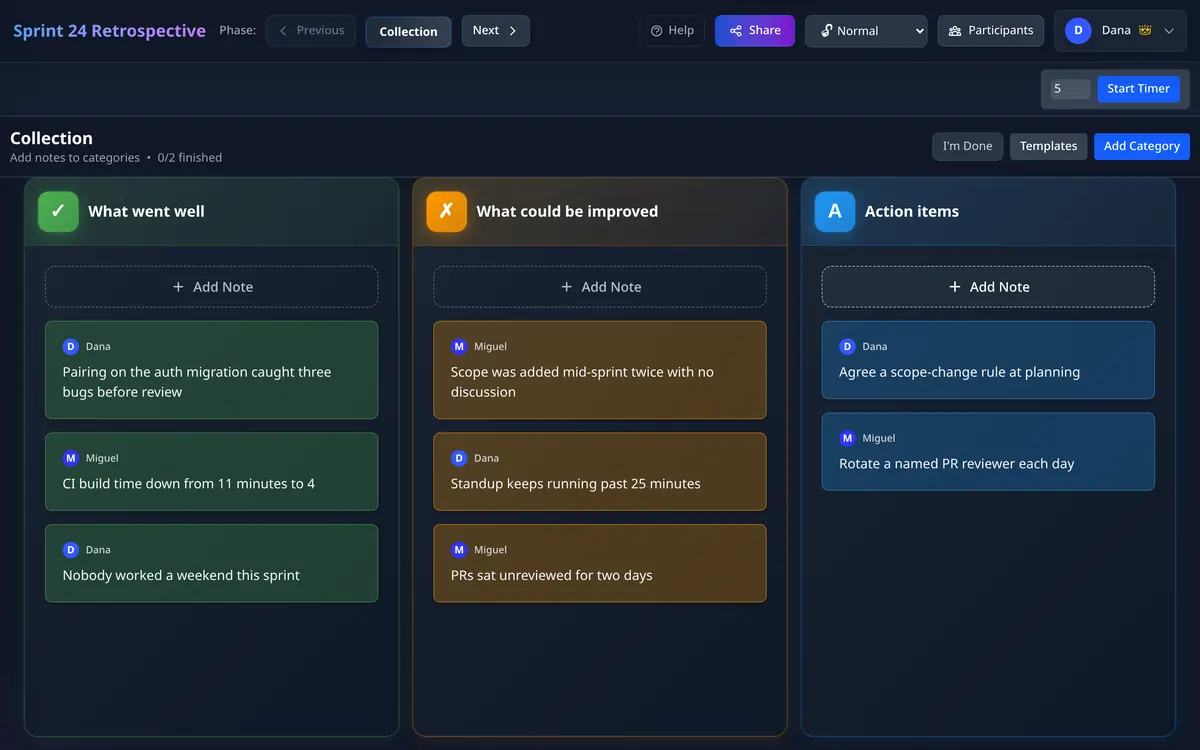
After Actions is a web-based tool for running sprint retrospectives — the recurring meeting where an agile or Scrum team reflects on the last sprint and decides what to change. It replaces the physical whiteboard and sticky notes with a real-time, collaborative board that everyone edits together from wherever they are.
The whole point is to remove friction. A facilitator creates a board and shares a link; participants join with a room code and start adding feedback immediately. There is no account required to run an anonymous session, so a team can be up and running before the meeting has properly started.
How a retrospective works
1. Collect
Everyone adds notes to categories like Start, Stop, and Continue. Feedback can be anonymous, which encourages candour.
2. Group
Drag related notes together so common themes emerge instead of a wall of duplicates.
3. Vote
Each participant gets a limited number of votes to surface what actually matters most to the team.
4. Act
Turn the top items into action items with owners, so the retrospective produces change rather than just conversation.
Who it's for
After Actions is built for software development teams: engineers, Scrum teams, Scrum Masters, engineering managers, and product teams — especially remote and hybrid ones that need everyone contributing at once rather than one person typing at a shared screen.
What makes it different
- No account to start. Anonymous retrospectives run peer-to-peer, with no sign-up and nothing to configure.
- Real-time collaboration. Notes, groups, and votes update instantly for everyone in the room.
- Anonymous feedback. Lower the social pressure so people say what they actually think.
- Exports you can keep. Download the results as a PDF or Markdown.
- Formats for whatever you need to learn. Start, Stop, Continue, 4Ls and Mad, Sad, Glad are built in, or name your own columns. See the retrospective templates guide for how to choose between five common formats.
- A team plan when you need history. Logged-in teams get persistent session history, shared team settings, and organization management.
Run your next retrospective in under a minute
No account, no setup. Create a board and share the link.
Start a retrospective